


David Nield is a freelance contributor at Popular Science, producing how to guides and explainers for the DIY section on everything from improving your smartphone photos to boosting the security of your laptop. He doesn't get much spare time, but when he does he spends it watching obscure movies and taking long walks in the countryside.
ArticleBody:Having built up its email, VPN, cloud storage, and password manager services, the Swiss-based and privacy-focused Proton company is now turning its attention to document editing in the cloud.
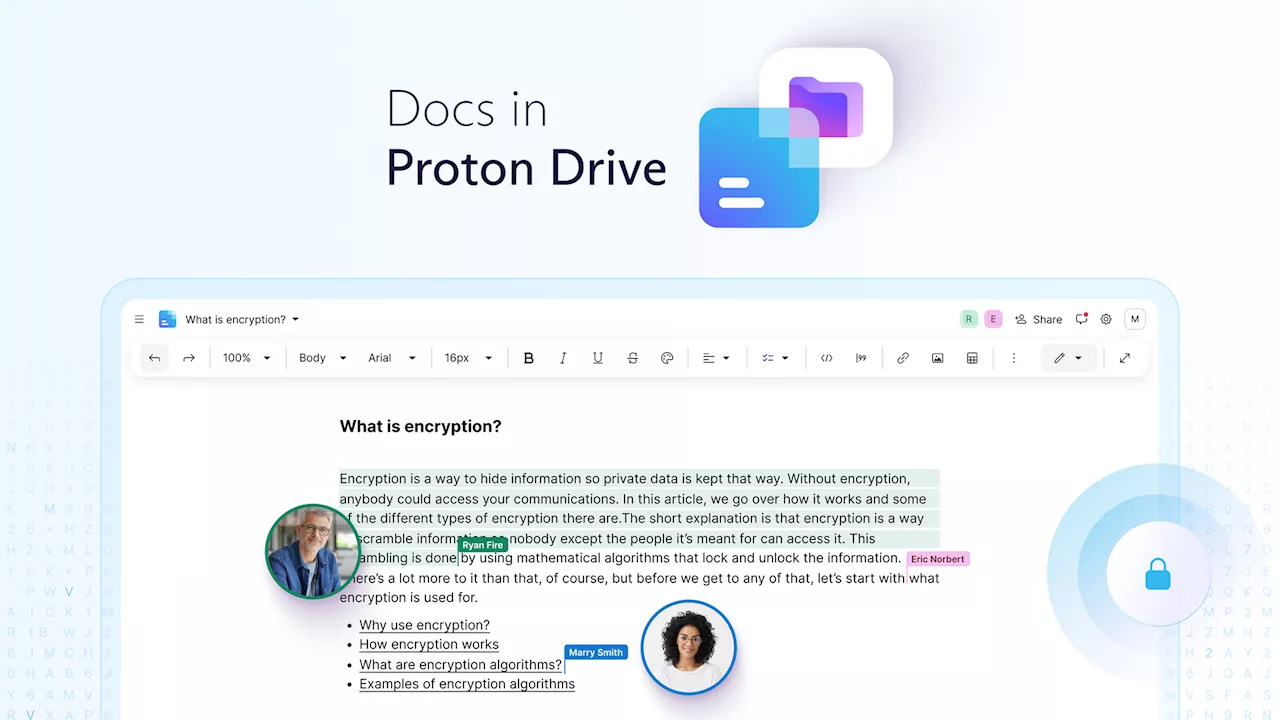
And the newly launched Proton Docs might have enough features and privacy protections to convince you to give it a go. The new Proton Docs ties into the Proton Drive service that's already available, offering users encrypted cloud storage for photos, videos, and other types of files. Sharing options are built right in, and Proton Drive can be accessed through a web browser or through the dedicated apps for mobile. What you get in Proton Docs End-to-end encryption underpins everything in Proton Docs. Screenshot: Proton The main benefit of using Proton Docs over Google Docs is privacy: The contents of your files and even your keystrokes and cursor movements are all end-to-end encrypted, so no one but you can get at them . It certainly makes your files more secure against hacks and data breaches. Of course in the interests of balance, we should point out that Google has very robust security protections in place around your data too—although not quite to the level of end-to-end encryption. Your files inside Google Drive aren't used to train AI, and Google has a very good record of keeping hackers out, but at the same time it is a company funded largely by targeted advertising and user profiling. Google is also based in the US, a country with more lax surveillance regulations than in Switzerland, where Proton's headquarters and data centers are located. 'Thanks to our open-source end-to-end encryption, you are the only one with the key to read and share your documents,' explains Proton in a blog post. 'Not even Proton can access your docs content or metadata .' Besides the privacy-first approach, Proton Docs already has a slew of useful features. Collaboration and sharing tools—essential for an online word processor—are already up and running, as is text formatting, image and table handling, and support for lists, code blocks, and pull-out quotes. As this is an online app running in a browser tab, everything is saved instantly, and there's decent support for other file formats—including Word files and files written in Markdown. The interface is clean and uncluttered, and straightforward to get around, and after you've spent some time inside the Proton Docs interface you might find the Google Docs equivalent a little too busy by comparison. What you don't get in Proton Docs Proton Docs uses a clean, lightweight web interface. Screenshot: Proton There's no doubt Google Docs has the edge over Proton Docs in terms of the depth and breadth of its features—as you would expect from an online word processor that's had a head start of nearly 20 years. For now, Proton Docs just offers the basics—plus all that extra privacy protection. There are more fonts and more layout options in Google Docs, for example, as well as useful tools like format pasting. Proton Docs doesn't yet have a word count feature, or text translation, or spelling and grammar checking—and there's no Gemini AI helper to churn out text or rewrite what you've written. You can't drop charts or digital signatures into Proton Docs, and you can't edit the headers and footers of a page. Unlike Google Docs, there's not a choice between a print layout and a page-less layout—you just get the latter, which you might prefer if you're not actually going to do any printing. The supporting Proton ecosystem isn't quite at the level of Google's either, in terms of Gmail, Google Drive, and all the other connected apps. If this sounds like we're being overly negative about Proton Docs, that's not the case: It's fast, and sleek, and it gives you more guarantees when it comes to privacy and security than the Google Docs equivalent. It's likely to win a lot of converts, and will no doubt be updated regularly, but you should be aware of the areas where it's currently lagging behind. You can get started with Proton Docs using a free Proton account, which gives you 5GB of cloud storage space for all your files. An upgrade to one of the paid plans, which start at $4.99 a month, give you more space and benefits across other Proton products .
United States Latest News, United States Headlines
Similar News:You can also read news stories similar to this one that we have collected from other news sources.
 How to insert a text box in Google DocsWhether you want to make text stand out, add some structure, or create a unique visual, we’ll show you a few ways to insert a text box in Google Docs.
Read more »
 Google Docs is getting Markdown support for headings, formatting, and moreGoogle is expanding the limited support for Markdown in Google Docs, using its autocorrect feature to let you format your document using text shortcuts instead of keyboard ones.
Read more »
 Zoom Is Going After Google and Microsoft With AI-Driven DocsThe video-conferencing app is trying to create an 'everything workplace' app in a crowded market.
Read more »
 Google Docs just got an interesting new rivalZoom launches its own Docs app to try to compete with the other giants such as Microsoft Word and Google Docs. Will it have what it takes?
Read more »
 How (and When) to Use Gemini AI in Gmail and Google DocsHere's where Google's Gemini-powered writing assistance pops up and how you can best use it.
Read more »
 How to use Gemini AI to write anything in Google DocsDT Video
Read more »