
Google Photos now lets you hide content from other apps and customize what you see.
Google is rolling out a much-needed update to the Google Photos photo grid that will help users organize their libraries and hide away clutter.and others, some users are already receiving the new options, announced via a pop-up that read, “New! Keep your Photos view free of clutter from other apps.
Hide all photos from other photo and social media apps or just the clutter.” After Google has enabled the feature on your account, you’ll be able to access a new “Photos View” settings page, which expands on the current “Personalize your grid” options with four new settings, the first three of which you can toggle on or off:The second option, “Only show backed-up content,” lets you see content from other apps as long as they have been backed up to Google Photos, or are waiting to be backed up. Selecting “Hide clutter from other apps” prevents content such as screenshots, GIFs and memes from appearing in your photo grid even if they have been backed up to Google Photos. A fourth option, “Customize by app,” lets you set up exceptions to these clutter rules so you can continue to see content from your favorite apps. For example, if you want to keep images from other apps out of your Google Photos library but continue to see pictures saved from Instagram or WhatsApp, you can make exceptions for just those apps. Deadline For Trump’s Federal Buyout Offer Extended By Court—As Over 65,000 Staff Agree To Leave: Here’s What To Know” function Google tested previously, adding more nuanced control for the user. Google has also been testing the ability to createIf you don’t see the new decluttering option, update your Google Photos app. On Android, the feature seems to require version 7.14 or later. However, I have version 7.15 installed and don’t yet have it, so you may have to wait for Google to enable it on your account.: Google Photos is gaining another important new feature in the form of increased protection against potentially misleading AI-manipulated photos. Starting now, Google will be adding invisible watermarks to images that have been edited on a Pixel using Magic Editor’s Reimagine feature that lets users change any element in an image by issuing text prompts. The new information will show up in the AI Info section that appears when swiping up on an image in Google Photos. The feature should make it easier for users to distinguish real photos from AI-powered manipulations, which will be especially useful as Reimagined photos continue to become more realistic.Our community is about connecting people through open and thoughtful conversations. We want our readers to share their views and exchange ideas and facts in a safe space.Insults, profanity, incoherent, obscene or inflammatory language or threats of any kindContinuous attempts to re-post comments that have been previously moderated/rejectedAttempts or tactics that put the site security at riskProtect your community.
Google Photos Declutter Google Photos Google Photos Other Apps Google Photos Filter Photos Google Photos Backed-Up Content Google Photos Customize Google Photos Photo Stacks Paul Monckton
United States Latest News, United States Headlines
Similar News:You can also read news stories similar to this one that we have collected from other news sources.
 New Google Leak Reveals Much-Needed Google Photos Feature UpgradeGoogle Photos' Photo Stacks Feature could be getting a much-needed upgrade, giving users manual control over stacking.
Read more »
 Google To Restore Much-Needed Google Photos Feature, Report ClaimsGoogle Photos Users may soon regain an important Partner Sharing feature that Google removed last year.
Read more »
 Google Home Adds Nest Protect and Matter Smart Lock SupportGoogle Home is getting new features through its Public Preview program, including support for Nest Protect and Matter-certified smart locks. Users will receive emergency notifications for smoke and carbon monoxide alerts, manage smart lock passcodes, and more.
Read more »
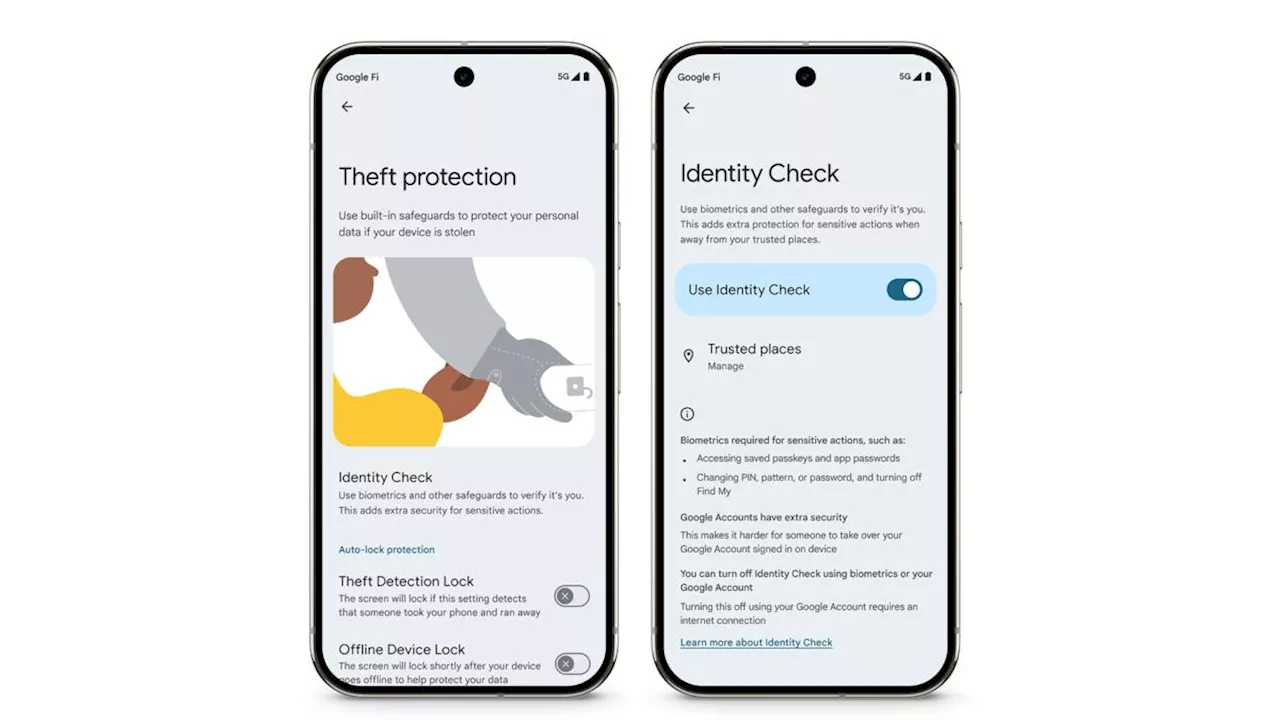 Google Adds Enhanced Security Measures to Android with Identity CheckGoogle introduces Identity Check, a new feature that requires biometric authentication for accessing critical settings on Android devices outside of trusted locations. This enhancement, along with the full rollout of Theft Detection Lock, aims to protect user data and prevent unauthorized access.
Read more »
 Rocking Royal podcast: BYU football adds 2 commitments after basketball adds 2 key winsThe BYU men's basketball team strung together consecutive wins for the first time in Big 12 play, first thumping Colorado for the Cougars' first true road victory before canning 15 3-pointers in a win over Cincinnati that preempted two new commitments for the BYU football team.
Read more »
 Google Photos Finally Adds Flip Feature After Pulling It Last YearAfter being pulled last year, the long-awaited 'Flip' feature for mirroring photos is finally back in Google Photos. Initially released last year but quickly withdrawn, the feature allows users to effortlessly flip their images vertically or horizontally. The rollout is currently limited to Android users, with iOS and web versions expected to follow.
Read more »